Localization
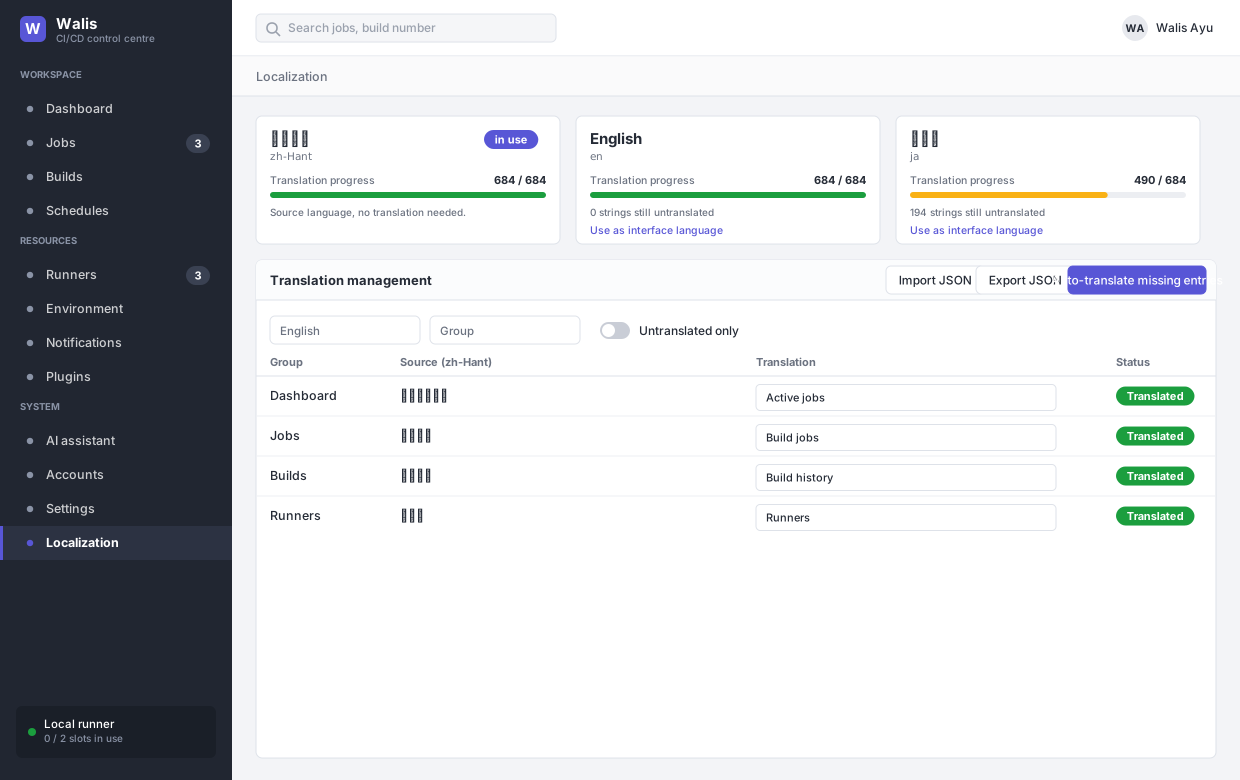
The interface ships in Traditional Chinese, English and Japanese.
How it is built
Traditional Chinese is the source language — the keys in the front end are the Chinese strings. English and Japanese ship as dictionaries in the bundle, and at load time the app overlays any overrides stored on the server.
A consequence worth knowing: an untranslated string falls back to displaying the Chinese original rather than a blank or a key name. Missing translations look like mixed-language UI, not broken UI.
Progress
Each language shows translated-of-total. Traditional Chinese is always complete by definition. The count moves when the app gains new strings, so a language that was at 100% can drop after an upgrade.
The translation editor
Filter by group — the screens the strings belong to — search text, or show only untranslated entries. Typing a translation applies it to the interface immediately; there is no publish step.
| Control | Does |
|---|---|
| Import JSON | Bulk-load translations. |
| Export JSON | Take them away for translation elsewhere. |
| Clear overrides | Drop server-side overrides and fall back to the shipped dictionaries. |
| Auto-translate missing entries | Fills the gaps using the configured AI provider. |
Auto-translation is a starting point, not a result — it does not know your product vocabulary. Review before shipping to users.
Adding strings
New interface text is added to Source/Walis.Admin/src/i18n/messages.ts alongside the screen that uses it. Overrides set here are stored on the server and survive upgrades; shipped dictionary entries are replaced by the upgrade.