Installation
Walis is one self-contained binary. What changes between deployments is where the data lives and how many nodes read it.
Choosing a topology
| Topology | Database | API nodes | Choose when |
|---|---|---|---|
| Single node, SQLite | SQLite file | 1 | The default. Nothing to run but Walis. |
| Single node + database | PostgreSQL / MySQL / SQL Server | 1 | You already run a database, or you want the option to scale later. |
| Cluster | PostgreSQL / MySQL / SQL Server | 2 or more | The API must survive a node going down. |
| Remote runners | any of the above | — | Builds need another machine, OS or architecture. |
Remote runners are orthogonal to the first three: add them to any topology without changing the database or the node count.
Install with one command
curl -fsSL https://walis.io/install.sh | shIt detects the platform, downloads the matching archive, verifies the Ed25519 signature on SHA256SUMS.txt (SHA256SUMS.txt.sig), checks the archive against it and installs it — /usr/local/walis as root, ~/.walis otherwise, with a walis symlink on your path.
Then start it and open http://<this machine>:11120 from any machine on the network:
walis --urls http://0.0.0.0:11120A fresh install answers plain HTTP, so this works the first time. Creating the first administrator asks for the setup code the server prints when it starts — see First connection.
To turn a machine into a build agent, install the runner instead and register it as a service:
curl -fsSL https://walis.io/install.sh | sudo WALIS_TOKEN=<token> sh -s -- \
  --runner --service --server http://walis.internal:11120 --name pi-01
--service writes the token to /etc/walis/runner.env (0600), writes a systemd unit and starts it. Each version installs into its own directory with a server-current symlink pointing at the live one, so an upgrade is a symlink swap. The script is POSIX sh — it runs under dash, which is /bin/sh on Debian and Ubuntu.
Windows is not covered: download the zip below. --base-url points the script at your own file server when the machine cannot reach GitHub.
What you download
deploy/release.sh produces one archive per platform, plus a SHA256SUMS.txt:
| Archive | Contains | Executable |
|---|---|---|
walis-<version>-<target> | API with the admin UI built in | Walis.Api |
walis-runner-<version>-<target> | The runner agent | walis-runner |
Targets: win-x64, win-arm64, osx-x64, osx-arm64, linux-x64, linux-arm64, linux-arm (32-bit Raspberry Pi), linux-musl-x64, linux-musl-arm64 (Alpine). Everything is self-contained — the target machine needs no .NET.
Single node, SQLite
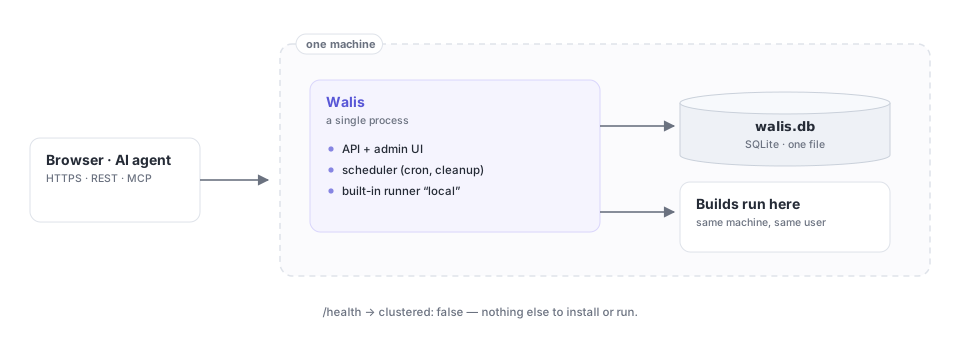
The default, and the whole point of Walis: nothing to install first.
tar xzf walis-<version>-linux-x64.tar.gz
./Walis.Api --urls http://0.0.0.0:11120
Open http://<this machine>:11120 and create the first administrator (First connection explains the setup code the form asks for). The database is created on first start at data/walis.db, relative to the API content root. The admin UI is served from the same port and origin as the API.
To keep the data somewhere else — a separate volume, or a path that survives release directories being replaced — set Walis:DataDirectory. That one setting moves the SQLite file, artifacts, the build cache and the default backup location together. Do not try to achieve the same thing with a symlink: Walis refuses to open a data directory that is one, because a symlinked data directory is exactly what a build script would create to redirect an artifact copy.
On macOS there is a turnkey service installer:
sudo ./deploy/install.sh --user <account> --port 11120It registers two LaunchDaemons — the service, running as an ordinary account rather than root, and a restarter that watches a trigger file so the self-update job can restart the service from outside its own process tree. On Windows and Linux, run the binary under whatever init system you already use.
GET /health reports clustered: false. That is not a limitation you have to plan around now — it is a starting point you can move off later with a backup and a restore.
Move on when you want the data off this machine, or you need more than one node.
Single node + database
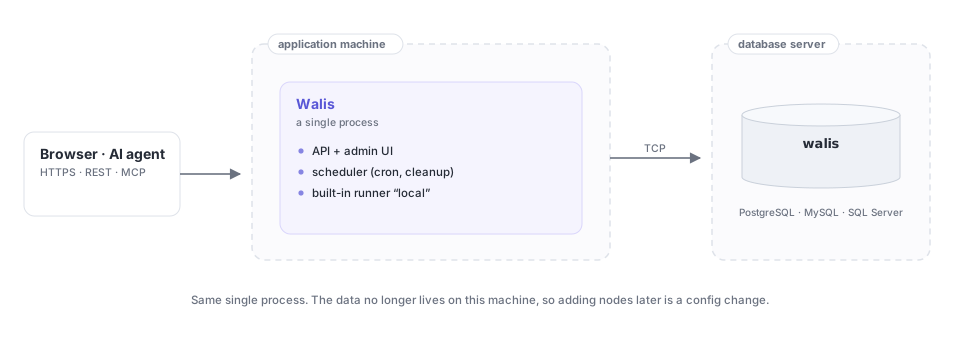
Still one process. The difference is that the data is no longer a file on this machine.
export ConnectionStrings__Walis='Host=db.internal;Database=walis;Username=walis;Password=…'
export Database__Provider=postgresql
./Walis.Api --urls http://0.0.0.0:11120
Database__Provider accepts sqlite, postgresql, mysql or sqlserver (postgres, npgsql, mariadb, mssql and azuresql are accepted aliases). Leave it unset and Walis guesses from the connection string — a wrong guess fails at startup rather than halfway through a build, which is the cheaper of the two failures.
Moving existing data across
The backup archive is engine-agnostic, so migrating is a backup and a restore:
- Back up on the SQLite deployment — Settings → Backup.
- Copy
secret.keyfrom the old data directory to the new one (or set the sameSecurity__EncryptionKeyon both), so encrypted secrets can be decrypted after restore. - Point the node at the new database.
- Restore the archive. Restore clears the target first (while merging audit records), so do it before putting traffic on it.
Cluster
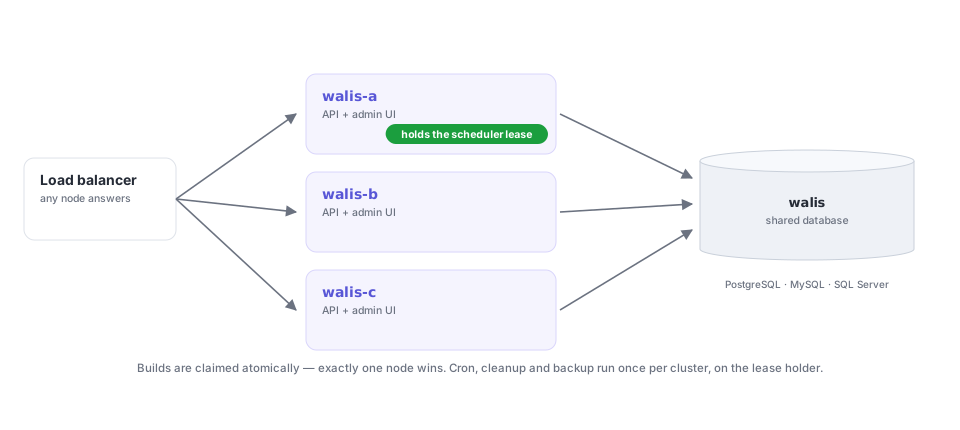
Two or more API nodes against one database, behind a load balancer.
Requirements: a server database — not SQLite. SQLite is a single file; pointing two nodes at one does not give you high availability, it gives you corruption, so Walis treats it as single-node and does not attempt to coordinate.
Give every node the same connection string and its own name:
export ConnectionStrings__Walis='Host=db.internal;Database=walis;Username=walis;Password=…'
export Database__Provider=postgresql
export Database__Node=walis-a          # defaults to the machine name
./Walis.Api --urls http://0.0.0.0:11120
Check which node answered:
GET /health
{ "status": "ok", "database": "PostgreSQL", "node": "walis-a", "clustered": true }
What the cluster does for you:
- Builds are claimed atomically. Two nodes can race for the same queued build; exactly one wins the
Queued→Runningtransition and the other moves on. - Once-only work is leased. Cron evaluation, offline-runner detection, retention cleanup and scheduled backups run on whichever node holds the lease. Leases expire, so a dead holder is replaced on the next pass — there is no coordination service to run, or to lose.
- Recovery is per node. A restarting node recovers only the builds it was running.
Details and the limits of what this buys you are in High availability.
Remote runners
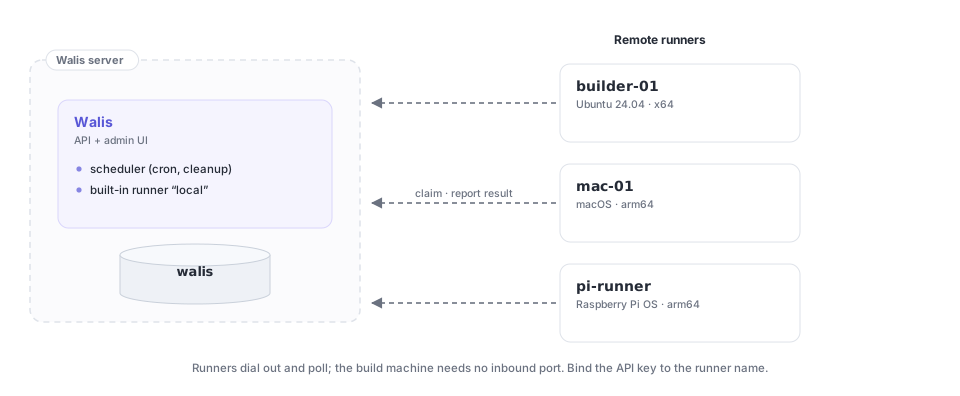
The built-in local runner executes on the API machine. To build somewhere else — another OS, another architecture, a machine with the signing key — register a runner.
walis-runner \
  --server https://walis.example.com/ \
  --name builder-01 \
  --labels linux,docker \
  --slots 4 \
--token walis_xxxxxx_yyyyyyyy| Flag | Meaning |
|---|---|
--server | API address. Env WALIS_SERVER, default http://127.0.0.1:11126. |
--name | Runner name. Env WALIS_RUNNER_NAME, defaults to the machine name. |
--labels | Comma-separated tags. Descriptive. |
--slots | Concurrent builds, default 2, clamped to 1–32. |
--token | API key. Env WALIS_TOKEN. Required once sign-in is enabled. |
--user / --password | Sign in instead of using a key. Needs an administrator account — prefer a bound key. |
--workdir | Root for jobs that do not set a working directory; each job gets its own subdirectory named after the job id. |
--external-isolation true | Declares that the whole runner lives inside a dedicated VM or container. Env WALIS_EXTERNAL_ISOLATION. Only needed when the server requires an isolation boundary. |
--interval | Poll interval in seconds, default 5, clamped to 1–300. |
An http:// address on another machine works too; the runner then starts with a warning that the key and the job's secrets travel unencrypted.
Bind the key to the runner name. Create the API key on the accounts page bound to this runner; it can then only claim and report builds for that runner, so a leaked key gets an attacker nothing else.
The runner dials out — it polls POST /api/runners/{name}/claim on your interval — so the build machine needs no inbound port and no public address. A 204 means nothing is waiting; a 200 carries the planned steps and the environment variables for the job.
Only jobs whose runner field names this runner are claimed by it. Jobs with no runner set always go to the built-in local runner.
The step loop is the same code locally and remotely, so a step behaves identically either way — only the sink differs, writing to the database or posting HTTP.